
SOLSCOPE
from zip to your own terminal.
Everything you need to build, configure, brand and publish your own non-custodial Solana token terminal. Read it top to bottom the first time. After that, press / and search.
01What you bought
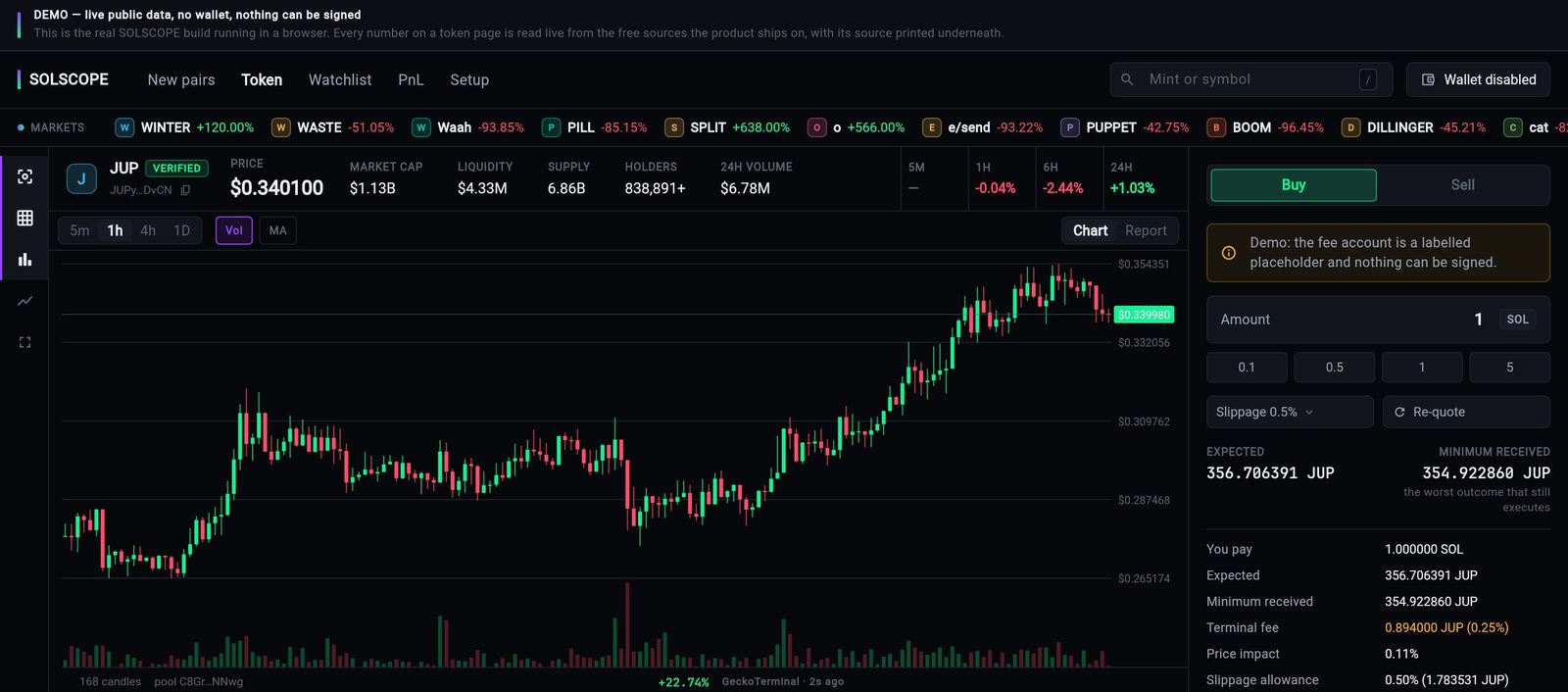
SOLSCOPE is a non-custodial Solana token terminal written in Flutter. It opens a token page that says what the token actually is — price, liquidity, FDV, holders, top holders, the dev wallet, mint and freeze authority, LP status and whether a sell routes at all — and lets the user swap through Jupiter without leaving the screen. Every figure carries its source.
There is no server. The app talks directly to free public data sources (Jupiter, Dexscreener, GeckoTerminal, a Solana RPC) and, when the user trades, their own wallet signs and the signed transaction goes straight to an RPC endpoint.
A fresh build charges nobody: the fee rate is 0, the fee account is empty and the fee switch is off. There is no default fee recipient anywhere in the source (lib/core/swap/swap_fee_config.dart), and no API key ships with the product.
| Part | Where | What it is |
|---|---|---|
| Terminal app | lib/ | One Flutter app for web, iOS and Android: New pairs, Token, Watchlist, PnL and Setup. |
| Operator console | The Setup tab (lib/features/settings/) | Fee, product switches, slippage, maintenance, block list, RPC, keys. No separate admin app. |
| Admin config contract | One JSON file you host | Configures every install at once (Configuration). |
| Tests | test/ | 449 automated tests, including fee wiring, PnL and demo proofs. |
SOLSCOPE never sees a seed phrase or private key from an external wallet. When the user chooses the in-app account instead, its seed is encrypted with AES-256-GCM under a key held in the platform keystore (lib/core/vault/vault_service.dart).
02Pick your path
03What is in the package
| Folder or file | What it is |
|---|---|
lib/app/ | Product identity (product_identity.dart), demo switch, start-up wiring. |
lib/core/ | Data clients (Jupiter, Dexscreener, GeckoTerminal, Helius, CoinGecko), Solana RPC and signing, the vault, wallet connectors, swap, PnL, watchlist and alerts, admin config. |
lib/features/ | The screens: terminal shell, token page and chart, swap panel, feed, watchlist, PnL, settings and operator console. |
lib/theme/ | Design tokens and theme. |
assets/fonts/ | JetBrains Mono 2.304 with its SIL OFL 1.1 licence. |
assets/brand/ | The app icon master (a placeholder you replace). |
android/, ios/, web/, macos/ | Platform projects. These docs cover web, iOS and Android. |
docs/*.md | The source notes these pages are based on: INSTALL, ADMIN-CONFIG, EARNING, SECURITY, FIREBASE, DEMO. |
.env.example | Template of the build-time settings. Placeholders only. |
test/ | Automated tests (flutter test). |
Your own Solana RPC endpoint for production traffic, optional Helius and CoinGecko keys, hosting for the web build, Apple and Google developer accounts if you publish apps, and the fee token account you want to be paid into. None of these are part of the purchase.
04Try it before you install
The public demo is the real build on live public data, compiled with SOLSCOPE_DEMO=true: solscope-demo.mikodes.com.
- No wallet can connect and nothing can be signed. The demo is built with an empty connector list, so there is no code path to a signature.
- The fee line uses a labelled placeholder account (
DEMoFeeAccountNotAnAccount…) so you can see where your fee appears. It is not an account. - The Setup tab is read-only in the demo, so one visitor cannot change what the next one sees.
05How to read these docs
- Dark boxes are commands. Press Copy in the corner and paste them into a terminal.
- Grey text after
#is an explanation. The Copy button leaves it out. - Text in angle brackets, like
<your-token-account>, is a placeholder. Replace it, brackets included. - Paths start at the unzipped project folder:
lib/app/…means theappfolder insidelib. - Required marks steps you cannot skip.
- Not active in this version marks things that appear in the app but do not work yet. They are listed so you are not surprised by them.