Setting up earnings
what exists, how to switch it on.
SOLSCOPE has one revenue mechanism that works out of the box — the Jupiter platform fee — and one that needs an arrangement you make yourself: paid listings. Both are off until you configure them.
01What exists in the code
| Tool | How it works | Set it in |
|---|---|---|
| Jupiter platform fee | A share of the output token of every swap routed through your terminal, paid by Jupiter to your token account as the trade settles. Implemented in lib/core/data/jupiter_client.dart (platformFeeBps on the quote, feeAccount on the swap). | Setup, config JSON or build defines |
| Paid listings | Promoted rows at the top of the new-pairs feed, always labelled as paid, each with an expiry. | Config JSON (promoted_mints) + Setup switch |
You earn only when somebody trades. There is no fee on a page view, a watchlist, an alert or a token page, and no referral scheme.
These are tools, not results. What you earn depends on your users and their volume. Check the rules on crypto interfaces, fees and taxes where you and your users are before you charge anything. Nothing here is legal advice; the Swap disclaimer field exists for whatever your jurisdiction requires.
02The Jupiter platform fee
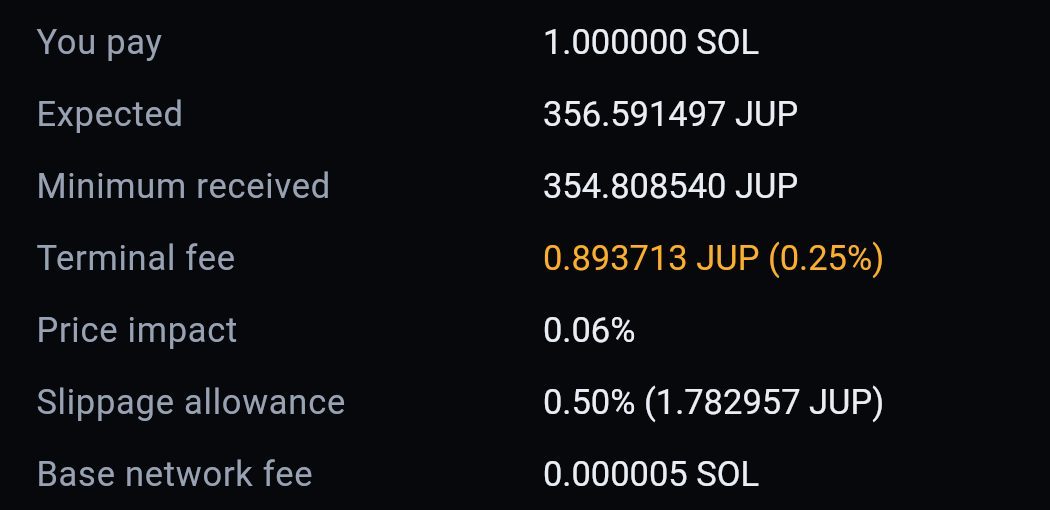
What it costs the user: exactly the rate you set, taken out of the token they receive. At 25 bps a user receives 0.25 % fewer tokens than with the fee off. No spread, no markup, and nothing on a trade that does not execute.
The user sees it before signing: the swap panel lists the terminal fee as an amount in the token being received, next to the minimum received and the slippage allowance (lib/core/swap/swap_preview.dart).
- Create your fee token accountSee below.
- Set the rate and the accountSetup → What this terminal earns → Fee rate and Fee account. Confirm the Status row reads Earning.
- Publish or pin itFor several installs, Copy as JSON and serve it at your config URL. For store builds, pin it:
flutter build web --release \ --dart-define=SOLSCOPE_FEE_BPS=25 \ --dart-define=SOLSCOPE_FEE_ACCOUNT=<your-token-account> - Test with one small real swapOpen the Operator fee wiring pane under the swap panel: "Both halves travel together" must read Yes. Then check that the account received the fee.
03The fee account
Required A Jupiter platform fee is not paid to a wallet address. It is paid to a token account: an associated token account (ATA) of your wallet for a specific mint. A wallet address is valid base58, so the console accepts it, but Jupiter rejects the swap.
- A terminal that mostly routes into SOL: create an ATA for wrapped SOL.
- A terminal that routes into many mints: create an ATA per mint you expect volume in, or register a Jupiter referral account, which covers many mints behind one address.
Use a wallet only you control, ideally a hardware wallet.
04When a route will not carry the fee
Some Jupiter routes cannot carry a platform fee. The quote then comes back without a fee block, and SOLSCOPE says so instead of pretending:
- The fee-wiring pane reports the fee as dropped and "Both halves travel together" reads No.
- No
feeAccountis sent with that swap (sending one against a fee-free quote would make the swap fail). - The user's fee line reads "None — this route would not carry it".
You earn nothing on that trade; this is not a configuration error.
05When you configure nothing
Nothing is charged, to anybody. SwapFeeConfig.empty() is the shipped default: rate 0, account empty, switch off. With any of the three missing, no platformFeeBps and no feeAccount are sent, and the user gets the same route as from any other Jupiter front end.
06Paid listings
- Agree the slot with the advertiserWhat you charge, and to whom, is your arrangement. The product enforces only the label and the expiry.
- Add the row to your config JSON
"paid_listings_enabled": true, "promoted_mints": [ { "mint": "<token-mint>", "label": "<label>", "expires_at": "2026-12-31T23:59:59Z" } ] - Check itThe row appears in New pairs with a paid badge and the same live figures as any other token. An expired or unparseable
expires_athides it.