Live demo · solscope-demo.mikodes.com

Read the token. Earn on the swap.

Run your own Solana terminal. Every swap routed through it pays your Jupiter platform fee into your account — and the user sees that fee before they sign.

The real build on live public data. No wallet, nothing can be signed.

  • Solana token terminal
  • Flutter source code
  • 14 docs pages
9:41
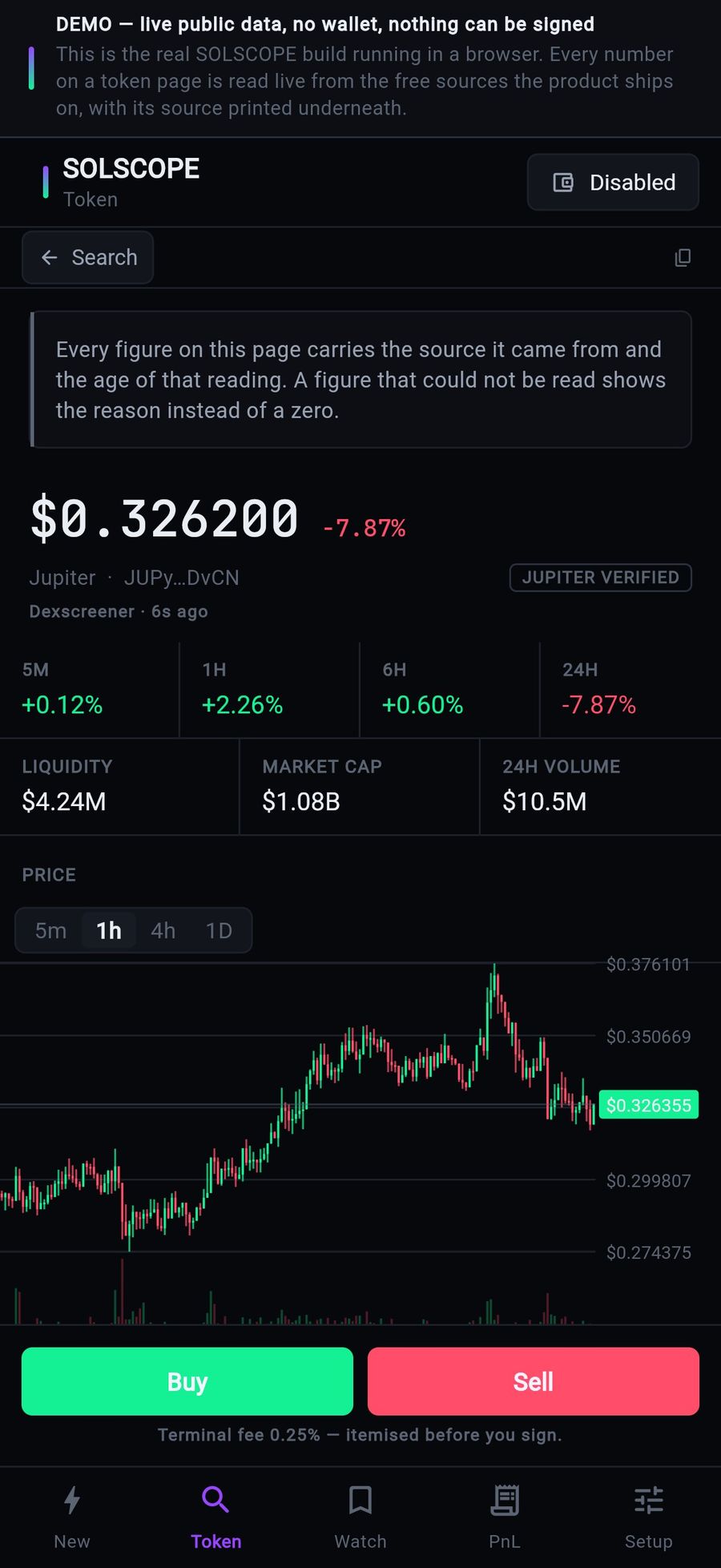
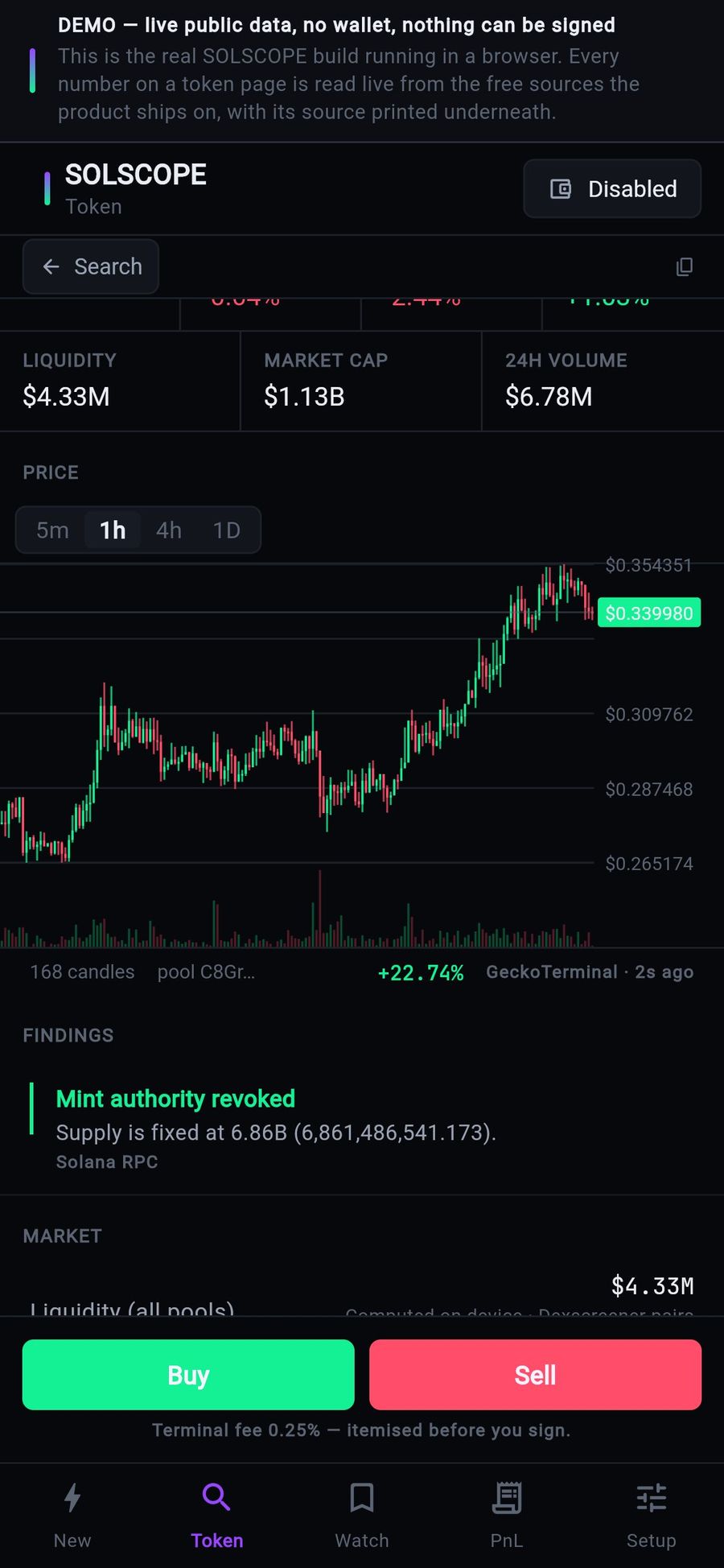
SOLSCOPE on a phone: JUP price, liquidity, market cap, candle chart and Buy / Sell buttons with the terminal fee noted
settings: rate, account, switch3
default fee recipient0
solscope-demo.mikodes.com
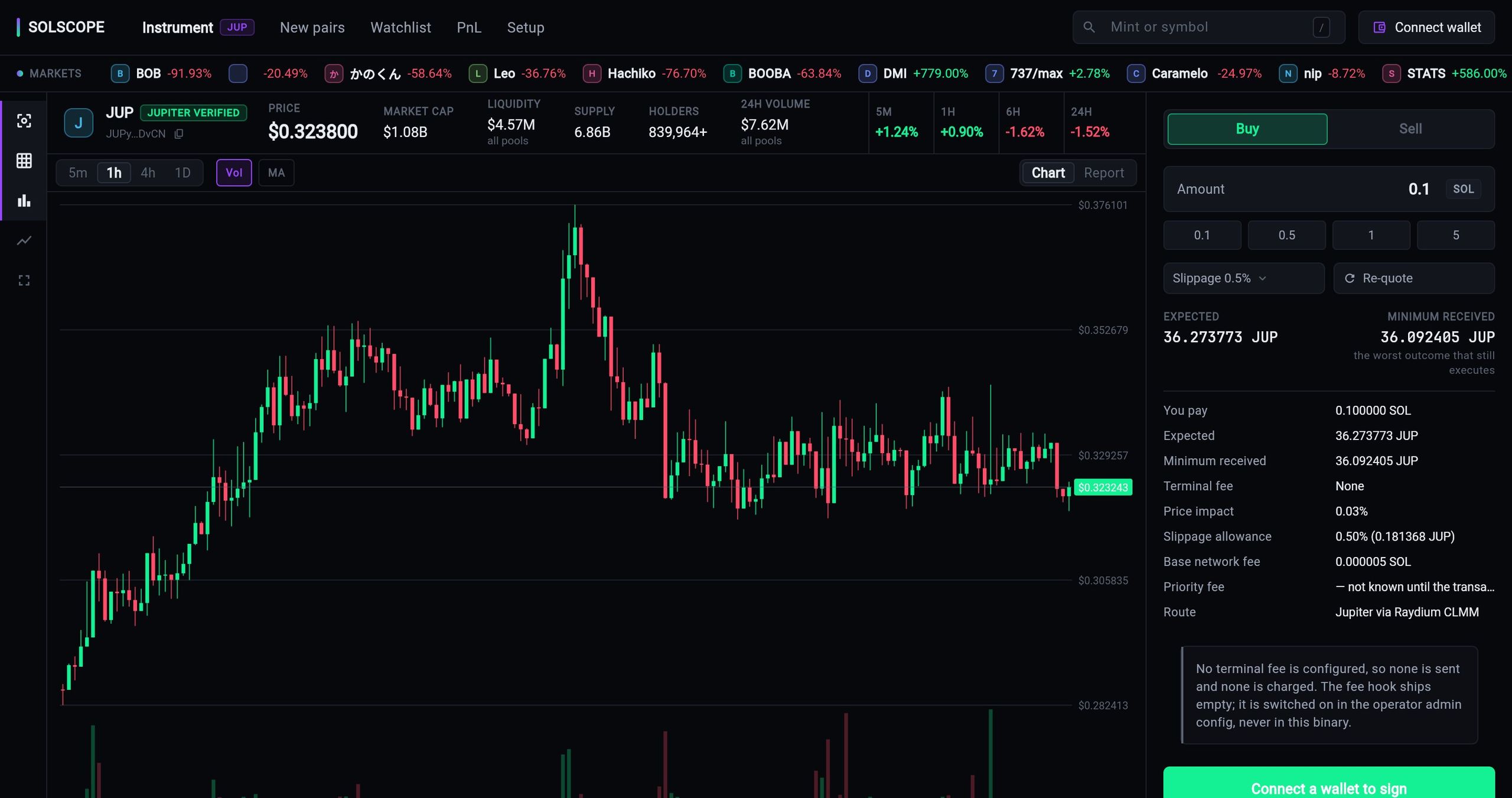
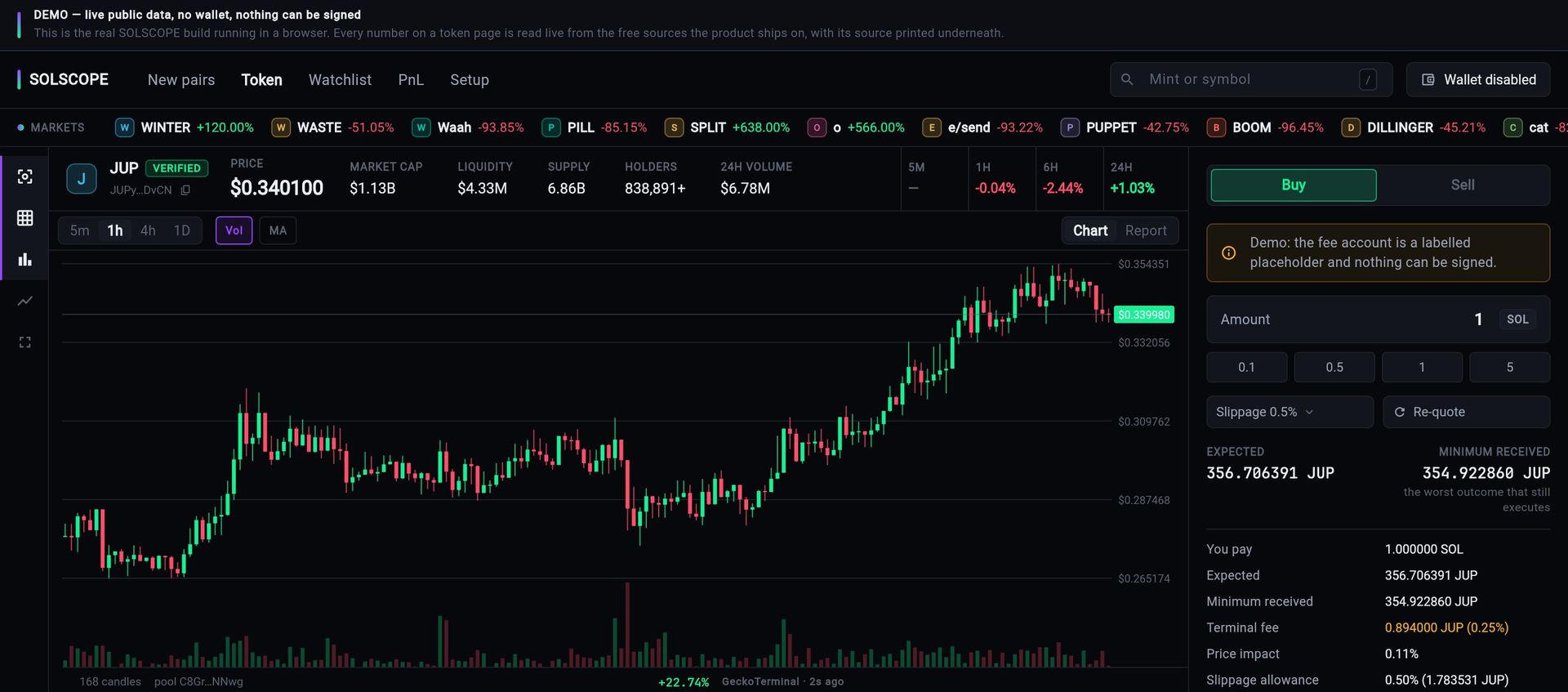
SOLSCOPE instrument view: the JUP pair with price, market cap, liquidity, supply, holders and 24h volume, a candle chart with volume, and the Buy / Sell ticket showing expected amount, minimum received, price impact, slippage, base network fee and route.
The live demo at solscope-demo.mikodes.com. The swap ticket is the product's own quote, including the line that says no terminal fee is configured on this build.

Built on

  • Solana
  • Jupiter
  • Flutter
  • Web
  • iOS
  • Android
  • Solana
  • Jupiter
  • Flutter
  • Web
  • iOS
  • Android
  • Solana
  • Jupiter
  • Flutter
  • Web
  • iOS
  • Android
  • Solana
  • Jupiter
  • Flutter
  • Web
  • iOS
  • Android
  1. Finda live feed of new Solana pairs, or paste a mint
  2. Readauthorities, holders, dev wallet, sell route — with sources
  3. Swapthrough Jupiter, every fee itemised before signing
  4. You earnyour platform fee on the output of every swap

Business plan

A Solana terminal.
Paid on every trade.

Buy the source code once. Run it under your brand. The revenue lines are already in the code — they pay you, not us.

  1. 01Buy the sourceThe full Flutter terminal for web and mobile.
  2. 02Brand itName, colours, fee rate and fee account in Setup or your admin JSON.
  3. 03LaunchDeploy the web build; ship the apps. No API keys shipped.
  4. 04GrowSell promoted rows in the new-pairs feed to projects that want eyes.

Who runs it

  • Memecoin and trading communities
  • Crypto media with traffic
  • Teams that want their own branded terminal

Where the money comes from

    Running costs Static hosting and public RPC. Optional paid RPC as you grow.

    How the buyer earns

    You earn when
    somebody trades.

    • Jupiter pays your platform fee — a share of the output token of every swap — into your token account as the trade settles.
    • Set the rate and the account in Setup, or publish them in your admin JSON to configure every install at once.
    • Optional paid listings: promoted rows in the new-pairs feed, always labelled as paid, with an expiry.
    • Ships empty: no default recipient anywhere in the source. Change nothing and it pays nobody, including us.
    3settings: rate, account, switch
    0default fee recipient
    0API keys shipped
    solscope-demo.mikodes.com
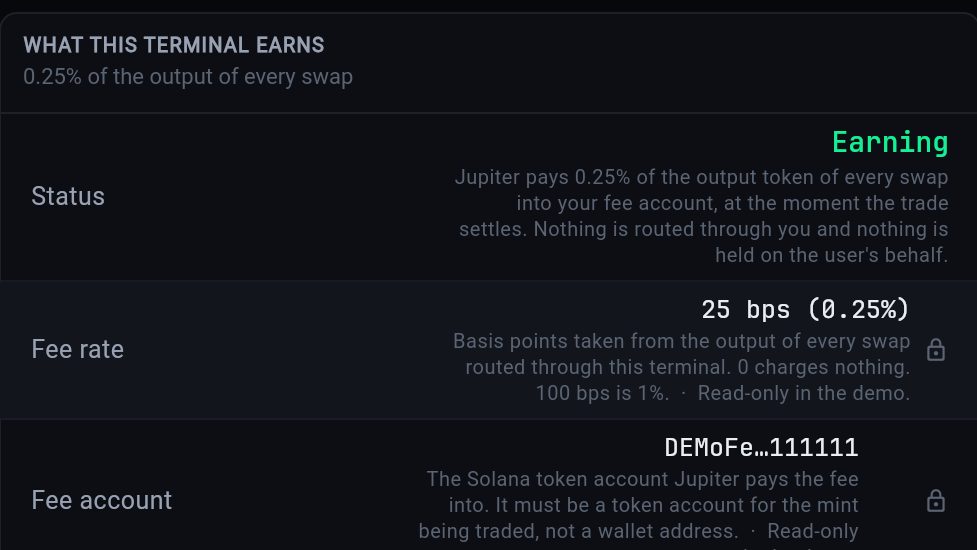
    Setup, What this terminal earns: status Earning, fee rate 25 bps (0.25%) and a labelled demo fee account
    See it in Setup →

    What it does

    A token page that tells the truth.
    A swap that shows the fee.

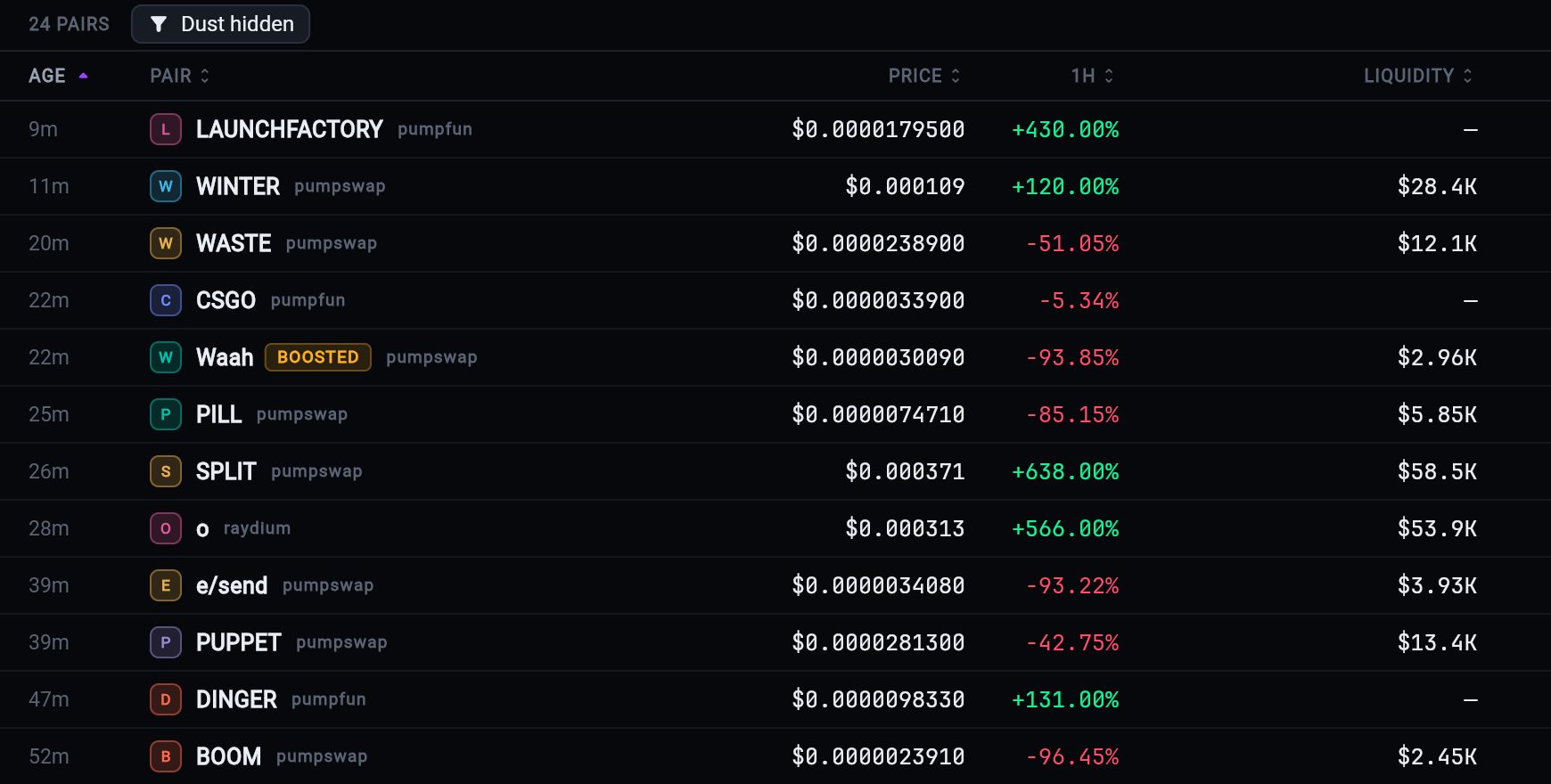
    New pairs table: age, pair, launchpad, price, 1h change and liquidity

    New pairs, live

    A feed of fresh Solana pairs from Dexscreener with age, price, 1h change, liquidity and volume. Paid rows are always labelled.

    Unreported liquidity shows a dash, never a zero

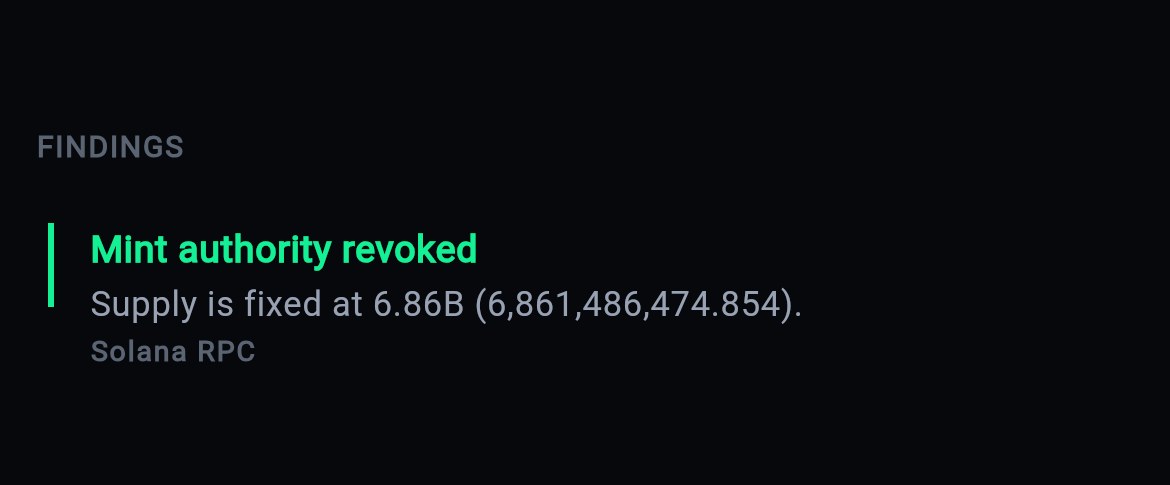
    Findings: mint authority revoked, supply fixed at 6.86B, read from Solana RPC

    Findings with sources

    Mint and freeze authority, supply, holders and top holders, the dev wallet and its funding source, LP status and a buy-then-sell round-trip check.

    No single risk score hides which fact caused it
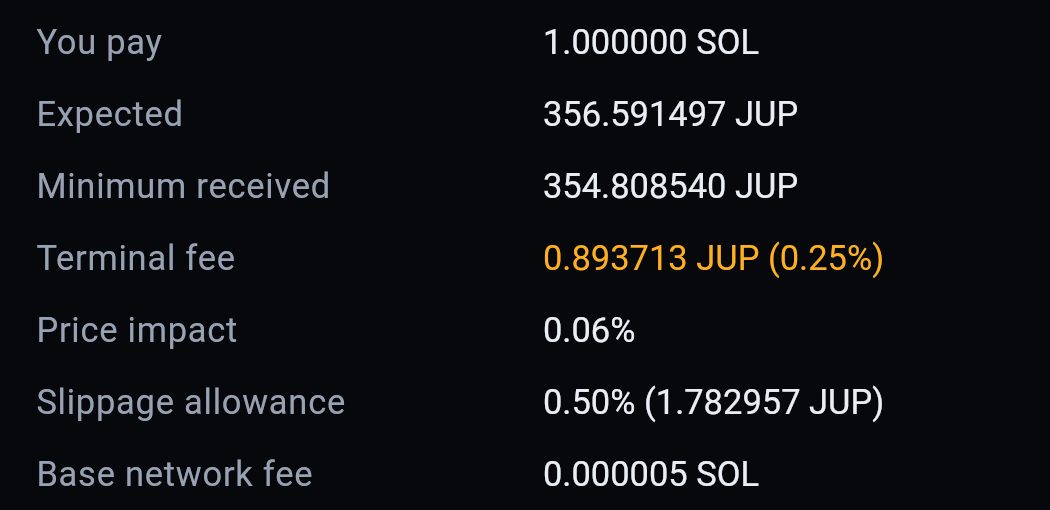
    Itemised Jupiter quote: you pay 1 SOL, minimum received, terminal fee 0.25%, price impact and base network fee

    Fee shown before signing

    The quote lists what you pay, the minimum received, the terminal fee as an amount, price impact, slippage allowance and the network fee.

    A route that drops the fee says so
    Quoted354.83 JUPquote
    Settled354.61 JUPchain
    Slippagepaid on this swap0.06%

    PnL after fees

    Realised PnL is computed from what the chain settled, not what the quote promised. The gap is shown as the slippage actually paid.

    Net of fees and network cost

    JUP moved −5% in 1h. Nothing was traded.

    WIF liquidity fell below your rule.

    priceliquiditynotify only

    Watchlist and alerts

    Watch tokens and set alert rules. An alert tells the user what happened — nothing is ever traded on their behalf.

    Notify only, never execute
    CandlesGeckoTerminal · keyless
    QuotesJupiter · keyless
    DexscreenerSolana RPCHelius (yours)

    Keyless free stack

    Jupiter, Dexscreener, GeckoTerminal and a Solana RPC — no API key ships. Add your own Helius, CoinGecko or RPC in Setup.

    A missing figure names the key that unlocks it

    Screenshots from the live demo on public mainnet data. The PnL, alert and data-source cards illustrate built features.

    The rest of the product

    What you cannot see from the front.
    The operator console, and the screen that stays empty.

    The terminal is the half a trader sees. These are the operator's own settings, what the product refuses to show before a trade exists, and the same build on a phone.
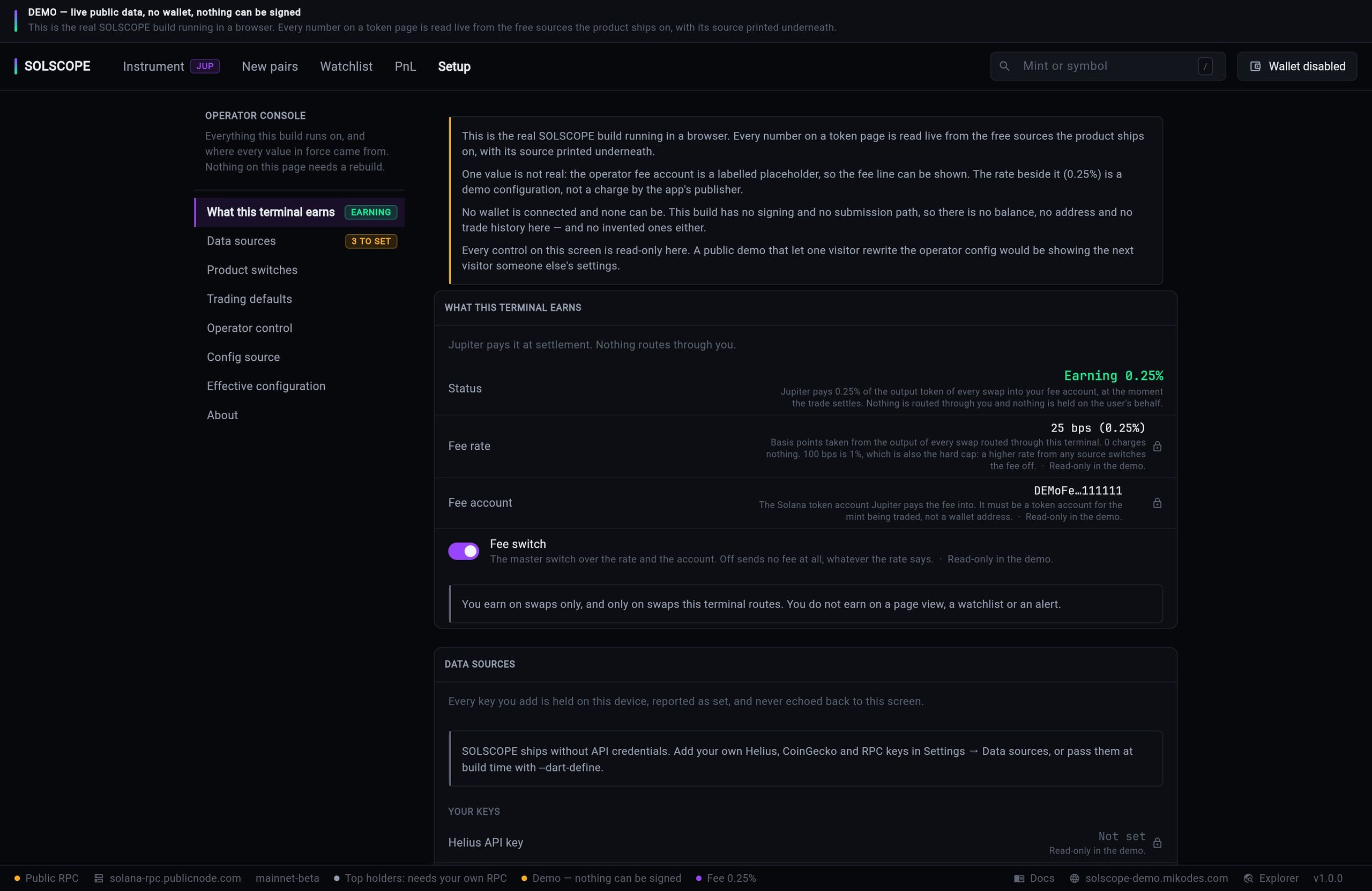
    What does the operator side look like, and what is there to set?

    solscope-demo.mikodes.com
    SOLSCOPE Setup in the live demo, titled Operator console: a notice says the fee account is a labelled placeholder and the 0.25% rate is a demo configuration, not a charge by the app's publisher; below it the fee status reads Earning 0.25%, the fee rate 25 bps with the note that 100 bps (1%) is the hard cap, the fee account a DEMO placeholder and the fee switch on, every control read-only in the demo; underneath, Data sources is marked 3 to set.
    Everything the build runs on and where every value in force came from, on one page that needs no rebuild. Keys are held on the device and never echoed back to this screen.

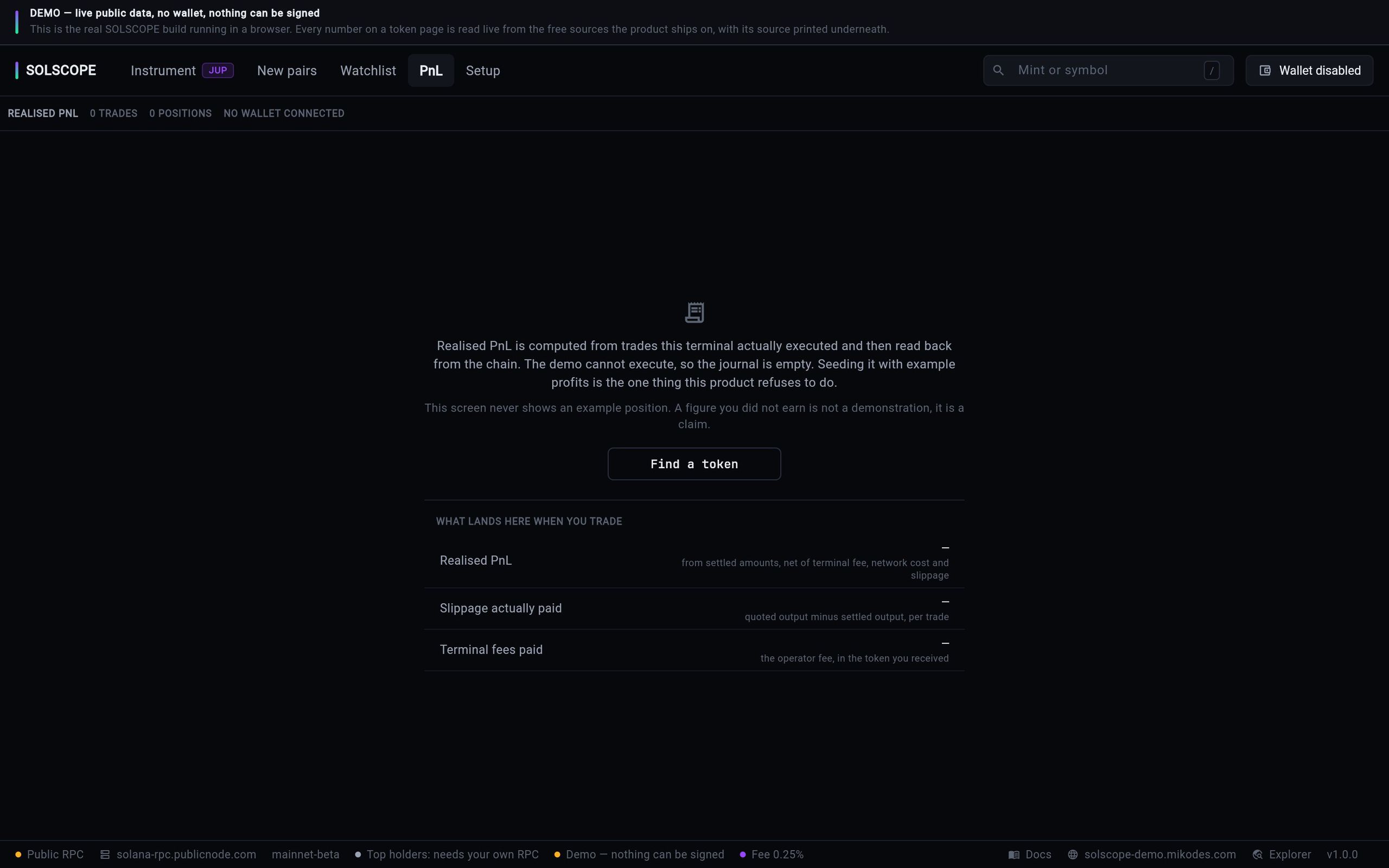
    What does it show before you have traded?

    solscope-demo.mikodes.com
    SOLSCOPE PnL in the live demo with no wallet connected: a line saying realised PnL is computed from trades this terminal executed and read back from the chain, that the demo cannot execute so the journal is empty, and that this screen never shows an example position, above a What lands here when you trade table listing realised PnL, slippage actually paid and terminal fees paid, each reading a dash.
    The product's own wording. Realised PnL is computed from what the chain settled, not from what a quote promised, so until something settles there is nothing to show.

    What does it look like on a phone?

    9:41
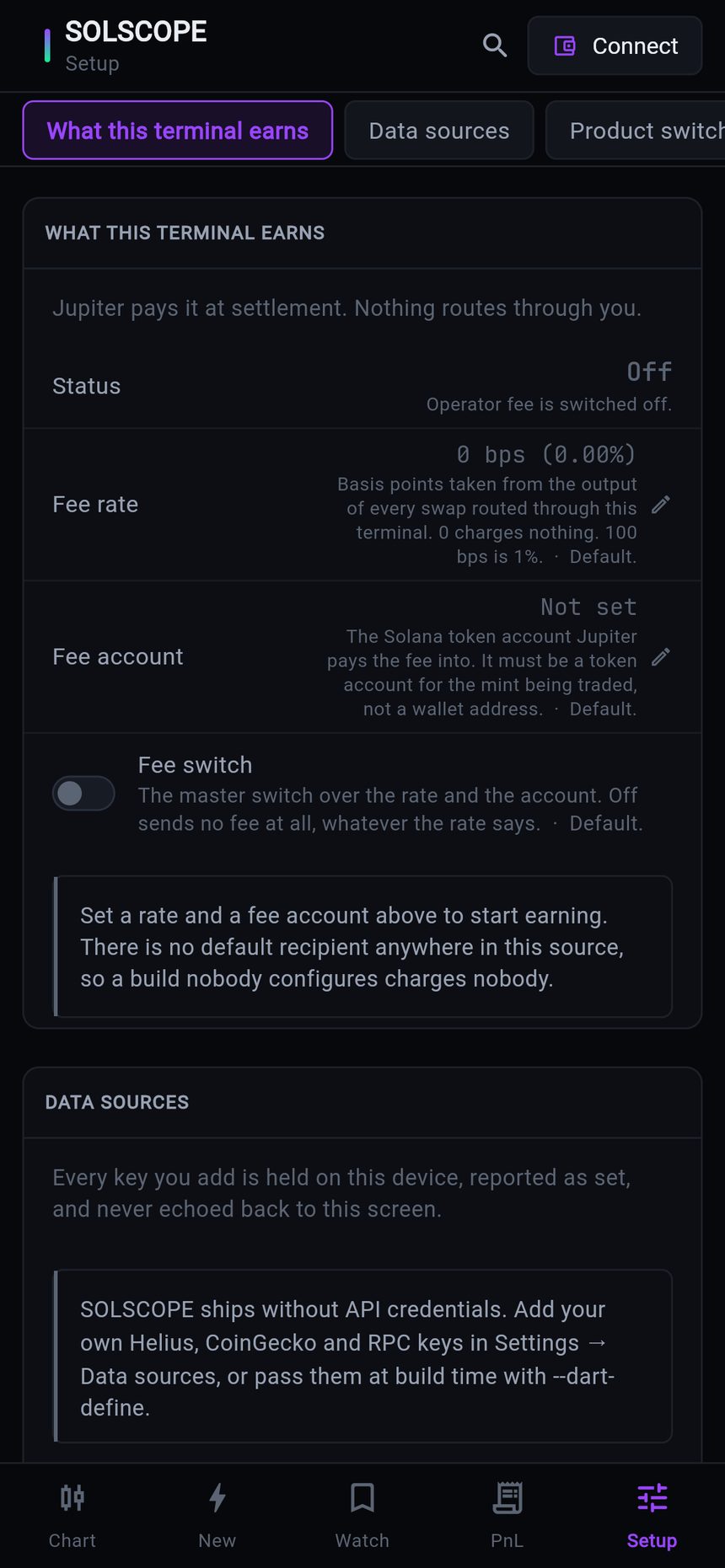
    SOLSCOPE setup on a phone: the operator console with the fee switch off and the data-source keys reading not set
    Setup
    9:41
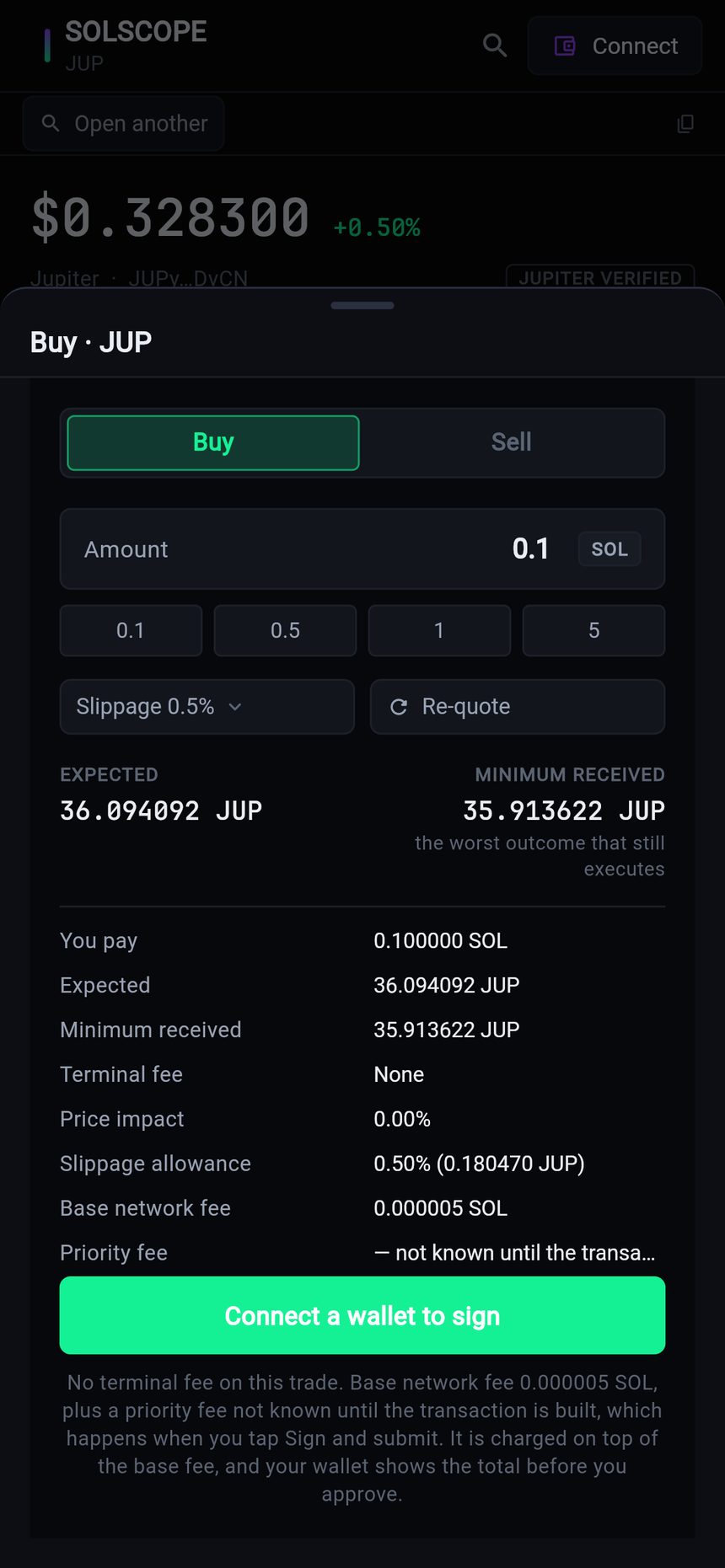
    A buy ticket on a phone: expected amount, minimum received, terminal fee, price impact, slippage allowance and the base network fee, all before anything is signed
    The ticket
    9:41
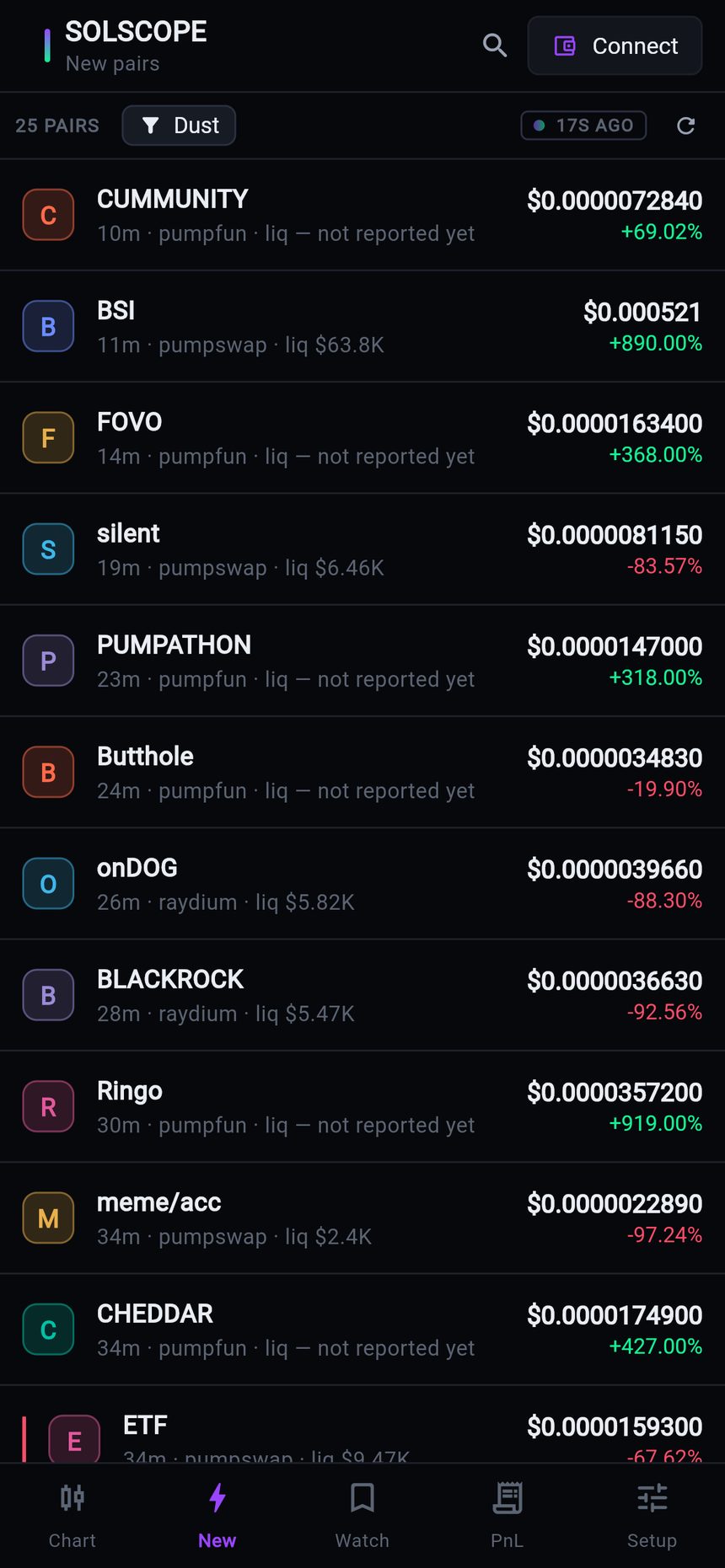
    New pairs on a phone: fresh Solana pairs with age, launchpad, price, one-hour change and liquidity, paid rows labelled
    New pairs
    One Flutter source builds the web terminal and the phone app; the fee hook and the key store behave the same on both.

    Interactive tour

    See every screen.
    Then try it live.

    Real screens from the product. Click a screen to enlarge it.
    9:41
    SOLSCOPE on a phone: JUP price, liquidity, market cap, candle chart and Buy / Sell buttons with the terminal fee noted
    SOLSCOPE desktop terminal: JUP token page with price, market cap, liquidity, holders, a 1h candle chart and the Buy panel with an itemised live Jupiter quote
    9:41
    SOLSCOPE desktop terminal: JUP token page with price, market cap, liquidity, holders, a 1h candle chart and the Buy panel with an itemised live Jupiter quote
    New pairs table: age, pair, launchpad, price, 1h change and liquidity
    Findings: mint authority revoked, supply fixed at 6.86B, read from Solana RPC
    Itemised Jupiter quote: you pay 1 SOL, minimum received, terminal fee 0.25%, price impact and base network fee
    solscope-demo.mikodes.com
    SOLSCOPE Setup in the live demo, titled Operator console: a notice says the fee account is a labelled placeholder and the 0.25% rate is a demo configuration, not a charge by the app's publisher; below it the fee status reads Earning 0.25%, the fee rate 25 bps with the note that 100 bps (1%) is the hard cap, the fee account a DEMO placeholder and the fee switch on, every control read-only in the demo; underneath, Data sources is marked 3 to set.
    solscope-demo.mikodes.com
    SOLSCOPE PnL in the live demo with no wallet connected: a line saying realised PnL is computed from trades this terminal executed and read back from the chain, that the demo cannot execute so the journal is empty, and that this screen never shows an example position, above a What lands here when you trade table listing realised PnL, slippage actually paid and terminal fees paid, each reading a dash.
    9:41
    SOLSCOPE setup on a phone: the operator console with the fee switch off and the data-source keys reading not set
    9:41
    A buy ticket on a phone: expected amount, minimum received, terminal fee, price impact, slippage allowance and the base network fee, all before anything is signed
    9:41
    New pairs on a phone: fresh Solana pairs with age, launchpad, price, one-hour change and liquidity, paid rows labelled
    solscope-demo.mikodes.com
    Setup, What this terminal earns: status Earning, fee rate 25 bps (0.25%) and a labelled demo fee account

    One screen.
    The token and the trade.

    Chart, figures, findings and the Buy/Sell panel with a live Jupiter quote — the demo runs the real build on public data.

    SOLSCOPE desktop terminal: JUP token page with price, market cap, liquidity, holders, a 1h candle chart and the Buy panel with an itemised live Jupiter quote
    9:41
    SOLSCOPE desktop terminal: JUP token page with price, market cap, liquidity, holders, a 1h candle chart and the Buy panel with an itemised live Jupiter quote
    Open the live demo →

    Non-custodial.
    Nothing hidden.

    Keys stay with the userThe user's wallet signs and the signed bytes go straight to an RPC. No relayer, no batcher, no server holding a key, seed or signature.
    Fee visible, never hiddenThe fee is an amount in the received token, on the quote and on the confirm button. Alerts notify; nothing trades for anyone.
    Bring your own keysHelius, QuickNode, Alchemy and Birdeye forbid sublicensing a key, so none ships. The public RPC fallback is rate limited.

    Wallet connect for Phantom, Solflare and Backpack plus an optional encrypted local wallet. Not legal advice: your jurisdiction is yours to check.

    Documentation

    Installed in an afternoon.
    Every step written down.

    14 pages written from the real code — requirements, install, configuration, deployment, troubleshooting.

    Documentation

    Buy source code

    Own SOLSCOPE.
    Ship it as yours.

    • Full source code, yours to rebrand and run
    • Documentation — 14 pages, also online
    • A live demo to click through before you pay
    • Item support through CodeCanyon

    Installation & customization

    Want it installed on your servers, rebranded or extended? The team that built it does that — write to us.

    SOLSCOPE · source code

    Coming to CodeCanyon

    The source code will be sold on CodeCanyon (Envato Market).

    Click through it yourself.

    Live demo on public mainnet data with signing disabled · coming to CodeCanyon

    Installation & custom work

    The download is not the end of it.
    Tell us what you need.

    The code is sold on CodeCanyon. The work around it — getting it live, changing it, or building you something of your own — is ours, and it starts as a conversation on Telegram, not a form.

    Install it for me

    You bought the code and you want it running, not a folder of files.

    • On your own servers, your domain, your keys
    • Your name and colours, not ours
    • Handed over working, with what we changed written down

    Add features

    SOLSCOPE plus the one thing it does not do yet.

    • A screen, a chain, a payment method, a report
    • Built into your copy, so updates still apply
    • We say up front if it is a bad idea

    Build something custom

    A product of your own, on foundations that already work.

    • Starts from what is proven here, not a blank page
    • Yours alone — we do not resell it
    • Same standard as the products on this page

    MIKODES is a Slovak company and has been selling on CodeCanyon since April 2019. 19 products run in the open at mikodes.com — Solana, Hyperliquid, Base, Telegram and WordPress. Tell us what you need and we will tell you what it takes; we will also say when we are the wrong people for it.

    Talk to us

    Start the conversation.

    Telegram is fastest and it reaches the person who built this, in English. Describe what you need and you get an honest answer about what it takes. The source code itself is sold on CodeCanyon.

    Telegram · fastest

    Talk on Telegram

    E-mail

    For installation and customization quotes.

    Other MIKODES products

    Also by MIKODES.

    Live demoBuy source code